> ## Documentation Index
> Fetch the complete documentation index at: https://docs.prelaunch.online/llms.txt
> Use this file to discover all available pages before exploring further.

# User Voting System

> Allow users to vote for features they want to see in your product

## User Voting Feature Overview

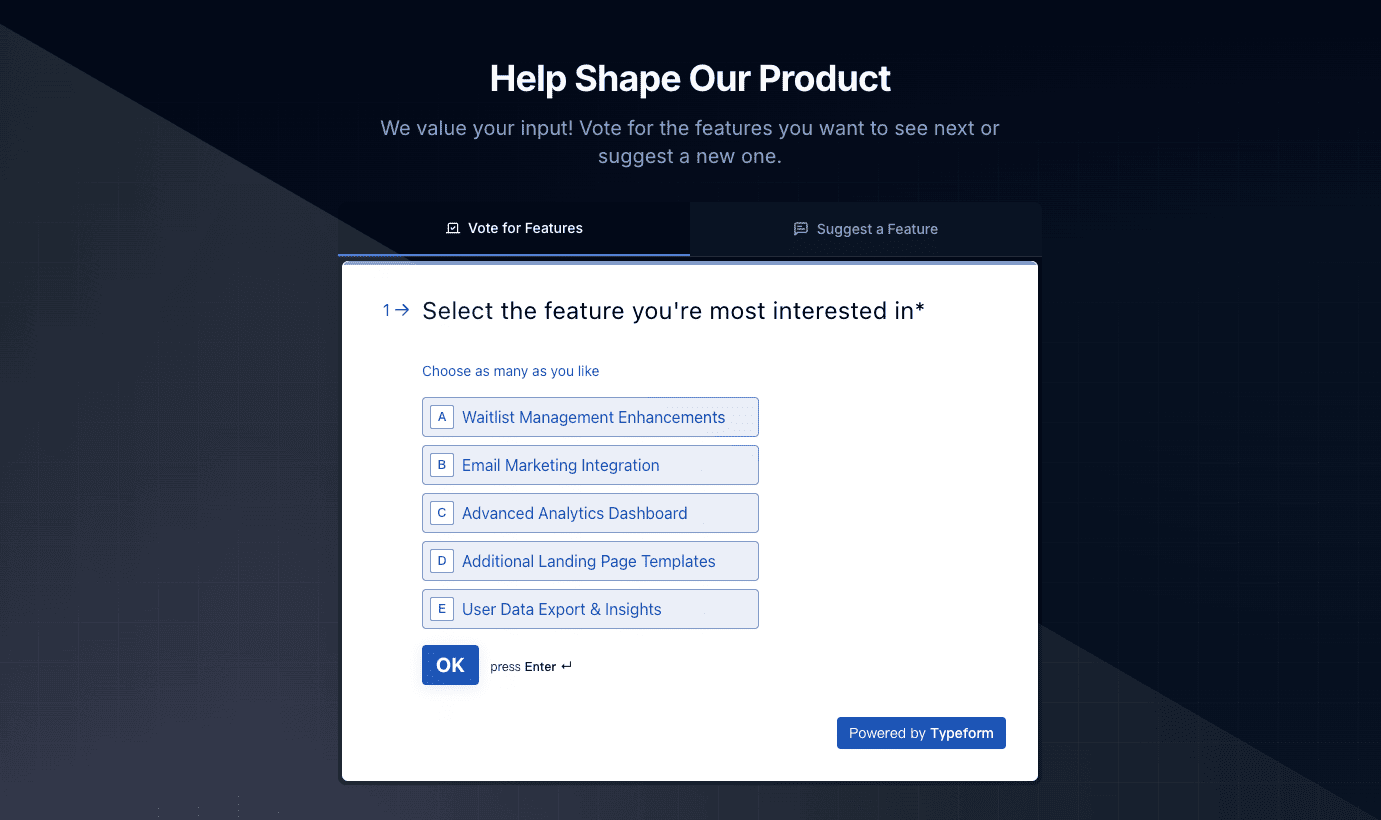
PreLaunch includes a powerful user voting system that allows potential users to vote on which features they would like to see implemented in your product. This provides valuable feedback during the product validation phase and helps you prioritize your development efforts.

<img src="https://mintcdn.com/maplegroup/jgEMOrBdhouQZGGT/images/voting-demo.png?fit=max&auto=format&n=jgEMOrBdhouQZGGT&q=85&s=219286911e7a0904b4615d9b165bea09" alt="User Voting System Example" width="1381" height="820" data-path="images/voting-demo.png" />

## Key Benefits

* **Understand User Preferences**: Get direct feedback on which features matter most to your audience
* **Data-Driven Prioritization**: Make product decisions based on actual user feedback
* **Engage Potential Users**: Keep early adopters engaged with your product development
* **Demonstrate Responsiveness**: Show that you value user input in your product roadmap

## Implementation Methods

PreLaunch's user voting functionality is implemented through Typeform integration:

### Typeform Voting Component

The easiest way to add voting functionality is using the built-in `TypeformVote` component:

```tsx theme={null}
import { TypeformVote } from '@/components/landing/TypeformVote';

export default function VotingSection() {
  return (
    <div className="voting-section">
      <h2>Help Shape Our Product</h2>
      <p>Vote for features you'd like to see in our upcoming release!</p>
      
      <TypeformVote />
    </div>
  );
}
```

## Configuration

### Basic Setup

1. Create a form on [Typeform](https://www.typeform.com/) with multiple-choice or ranking questions for feature voting
2. Set up the required environment variables in your `.env.local` file:

```
# Typeform Configuration
TYPEFORM_ACCESS_TOKEN=your_typeform_access_token
TYPEFORM_VOTE_FORM_ID=your_vote_form_id
```

### Customizing the Voting Form

You can customize the voting functionality by modifying the `TypeformVote.tsx` component:

```tsx theme={null}
// Customize button text
<TypeformVote buttonText="Vote for Features" />

// Customize styles
<TypeformVote className="bg-blue-500 hover:bg-blue-600" />

// Customize modal size
<TypeformVote modalHeight="600px" modalWidth="100%" />
```

## Collecting and Analyzing Results

Typeform provides several ways to access and analyze voting results:

1. **Typeform Dashboard**: View and export results directly from your Typeform account
2. **Typeform API**: Set up webhooks to receive results in real-time
3. **PreLaunch Webhook Integration**: PreLaunch includes a pre-configured webhook endpoint at `/api/typeform/webhook` that can process incoming results

### Processing Webhook Data

Typeform can send voting data to your application's webhook endpoint:

```typescript theme={null}
// pages/api/typeform/webhook.ts
import type { NextApiRequest, NextApiResponse } from 'next';

export default async function handler(
  req: NextApiRequest,
  res: NextApiResponse
) {
  if (req.method !== 'POST') {
    return res.status(405).json({
      success: false,
      error: {
        code: 'METHOD_NOT_ALLOWED',
        message: 'Only POST requests are allowed',
      },
    });
  }

  try {
    // Process incoming Typeform data
    const data = req.body;
    // Store in your database, update voting counts, etc.
    
    return res.status(200).json({ success: true });
  } catch (error) {
    console.error('Error processing webhook:', error);
    return res.status(500).json({
      success: false,
      error: {
        code: 'INTERNAL_SERVER_ERROR',
        message: 'Error processing webhook data',
      },
    });
  }
}
```

## Displaying Voting Results

You can display voting results on your roadmap or dedicated results page:

```tsx theme={null}
import { VotingResults } from '@/components/VotingResults';

export default function ResultsPage() {
  return (
    <div className="results-page">
      <h1>Feature Voting Results</h1>
      <p>See what features our community wants most!</p>
      
      <VotingResults />
    </div>
  );
}
```

## Common Questions

<AccordionGroup>
  <Accordion title="Can I allow users to suggest new features?">
    Yes! PreLaunch also includes a suggestion collection feature via Typeform. You can use the `TypeformSuggestion` component to collect open-ended feature ideas.
  </Accordion>

  <Accordion title="How do I update the list of features to vote on?">
    You would need to update your Typeform form with new features. After updating, the changes will automatically reflect in your integration.
  </Accordion>

  <Accordion title="Can users see the voting results?">
    This is configurable. By default, users don't see results immediately, but you can either enable this in Typeform or build a custom results display page.
  </Accordion>
</AccordionGroup>

## Related Links

<CardGroup cols={2}>
  <Card title="Waitlist Feature" icon="list-check" href="/features/waitlist">
    Learn how to collect user emails with the waitlist feature
  </Card>

  <Card title="Roadmap Feature" icon="map" href="/features/roadmap">
    Display your product roadmap with voting results
  </Card>
</CardGroup>
